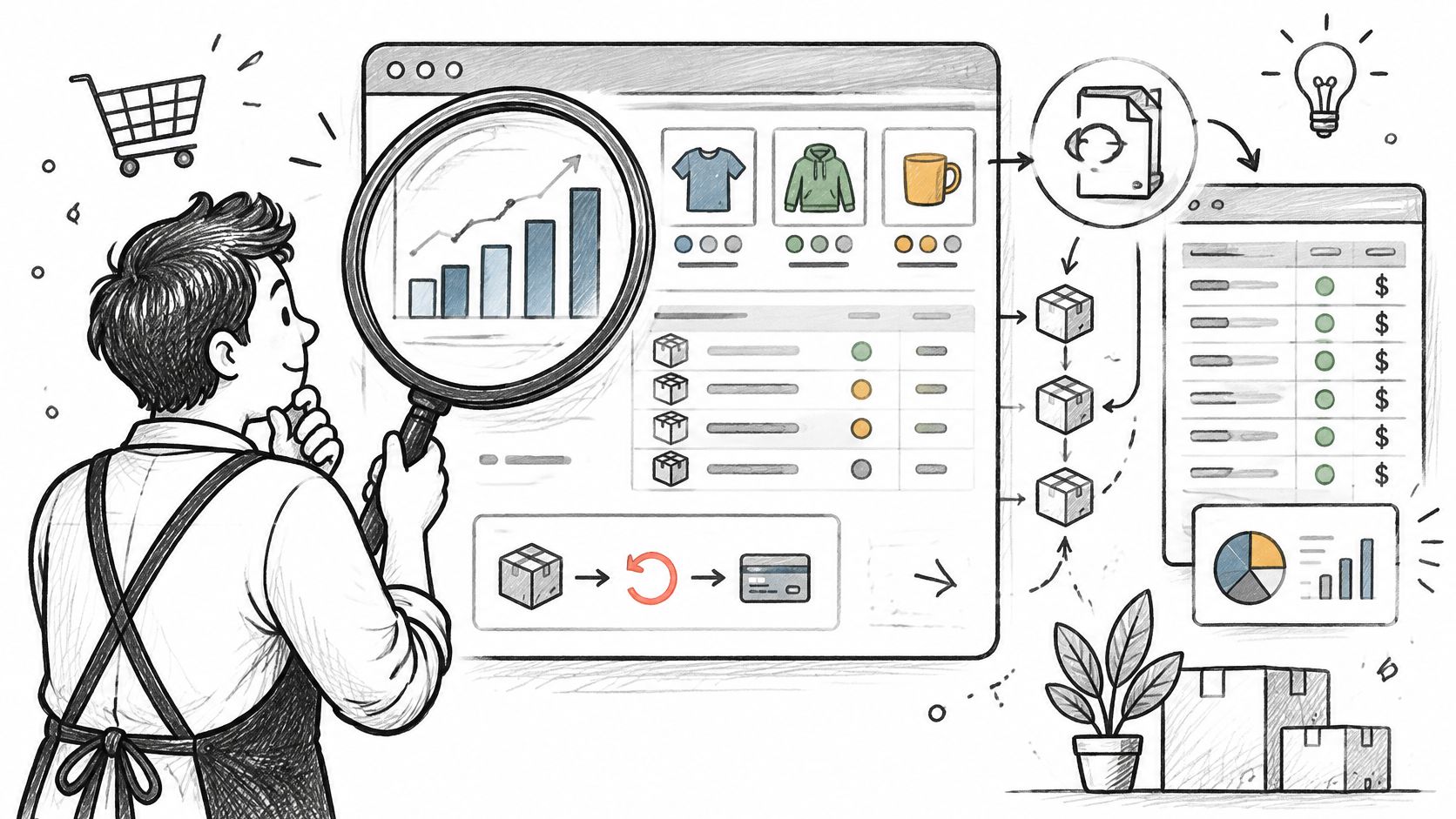
You're trying to answer a straightforward question: which product variants brought in the most net sales last month? BigCommerce's admin can show useful sales and merchandising trends, but the number you need may depend on line items, discounts, refunds, and the date range you choose. If those pieces aren't defined consistently, two reports can show different totals for the same store.
BigCommerce custom reports help turn questions like that into repeatable views of store performance. Start with the native reports for quick checks, then use exports or a reporting tool when you need specific columns, filters, or calculations. Chartsy adds another option: you can ask questions about BigCommerce store data in plain English and get charts, without manually assembling a complex spreadsheet.
Table of Contents
- Native BigCommerce Reporting Options Compared
- Gross Sales, Net Sales and Refunds Explained
- Building Net Sales Reports for Common Merchant Questions
- Analyzing Variants, Categories and Repeat Customers
- When Renewal Orders Change What a Report Means
- Choose the Right Reporting Method for Your Store
Native BigCommerce Reporting Options Compared
BigCommerce's native Ecommerce Analytics covers visitor metrics, order trends, merchandising performance, customer data, marketing data, and SKU-level analysis. You can set a reporting date range and use search and filters to narrow customer, product, and order data. BigCommerce says the majority of Analytics reports update in near real time, defined as less than 60 seconds, so they can support current checks as well as period reviews. The BigCommerce Ecommerce Analytics documentation also notes two reconciliation details: archived orders are excluded from Analytics reports, and tables in supported reports can be downloaded as CSV after you select a date range.
| Option | Best for | Main limit | Setup effort |
|---|---|---|---|
| Native Ecommerce Analytics | Store, product, SKU, order, and customer trends with date-range comparisons | Archived orders are excluded; calculations are limited to what the report provides | None, available in the admin |
| CSV export of orders, customers, and products | Line-level records for a spreadsheet or BI tool | Static snapshot; repeat the export for each analysis | Low for one-off work, manual for recurring work |
| Looker Studio through the BigCommerce BigQuery integration | Interactive visual reports built on store data | Requires BigQuery and Looker Studio setup; design depends on the data model | Moderate, with technical setup |
| BigCommerce REST APIs for Orders, Customers, and Products | Custom calculations, such as net sales per variant | You build and maintain the data pipeline, joins, and refund handling | High, usually developer work |
| Third-party analytics tool such as Chartsy | Plain-English questions, charts, and dashboards without building a pipeline | Supported metrics and data history depend on the tool | Low to moderate |
For more flexible visual reporting, BigCommerce's Looker Studio integration sends store data to BigQuery, where you can model it for interactive reports. BigCommerce lists example reports for Product Revenue by Category, Cost of Goods Sold, and Revenue by City. That route offers control, but someone still needs to maintain the data model and report design.
The practical choice is between a repeatable view, a one-off line-level dataset, or a calculation that needs its own logic. For a closer look at where native reports fit, see why BigCommerce's built-in analytics may not be enough.
Gross Sales, Net Sales and Refunds Explained
A report total is only useful when you know what it includes. Net sales is a calculated number, not a single field you can assume every report displays the same way.
| Measure | What it means | Where to find it |
|---|---|---|
| Gross sales | Value of items sold before discounts, refunds, and taxes | Line-item price multiplied by quantity |
| Discounts | Reductions applied at checkout or to specific items | Order-level and line-level discount fields |
| Refunds | Money returned to the customer, including eligible product or fulfillment amounts | Refund records created through refund quote and refund requests |
| Taxes | Tax collected on the order, generally excluded from net sales by policy | Order tax fields; use one tax-inclusive or tax-exclusive basis throughout |
| Net sales | Gross sales minus discounts and refunds, with tax and shipping treatment set by policy | Calculated in the report, not a single native field |
| Average order value (AOV) | Net sales divided by the number of orders in the period | Calculated from order-level data |
| Refund rate | Refunded amount divided by gross sales for the same period | Calculated from order and refund data |
| Profit | Net sales minus cost of goods and other costs | Requires verified cost data |
Hypothetical example: An order contains two items priced at $40 each, so gross sales are $80. A $10 discount and a $15 refund for one item bring net sales to $55 if the report excludes tax and shipping. Include shipping under a different policy and the result changes, so put the policy in the report definition.
A refund isn't always a returned product. BigCommerce refund records can cover product quantities, shipping, handling, gift wrapping, or a custom order-level amount. Its refund documentation gives an example with a $10.00 product, $0.83 tax, and $10.00 shipping, for a total refundable amount of $20.83 when all components are included.
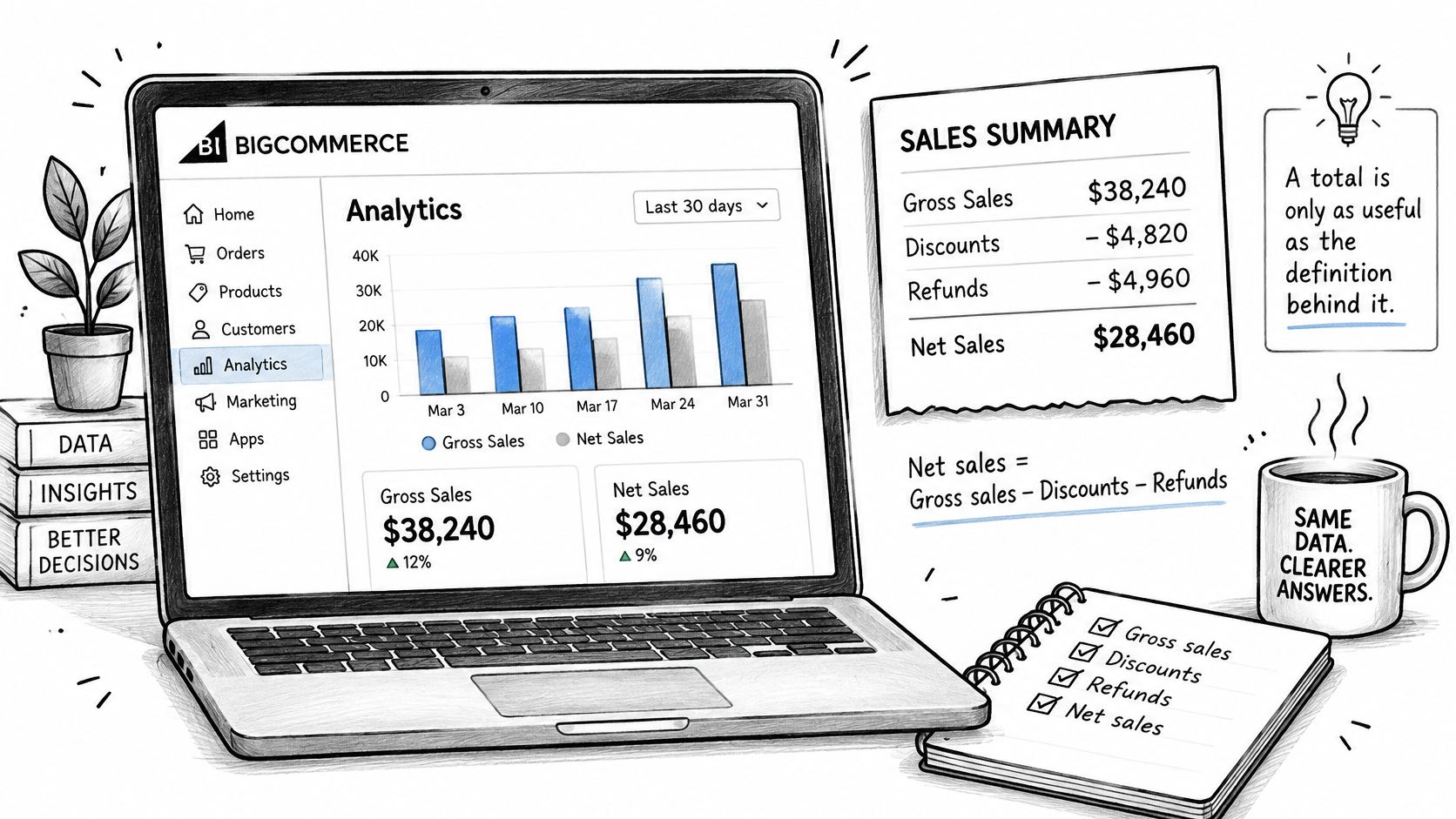
Choose tax-inclusive or tax-exclusive values, then apply that basis consistently. Keep discounts and refunds visible as separate measures so a manager can see why net sales changed. Profit needs verified product costs and other relevant expenses; don't label a sales report as profit just because it subtracts refunds. For another explanation of the calculation, see the net sales metric guide.
Building Net Sales Reports for Common Merchant Questions
A useful output is a net sales table by variant SKU for a chosen period that can be reconciled to order-level totals. Native Analytics may provide relevant trends, while exports or a data pipeline supply the fields and joins needed for a custom calculation.
| Merchant question | Native Analytics coverage | Export or pipeline needed | Practical approach |
|---|---|---|---|
| Which product variants generated the most net sales last month? | SKU-level sales trends; refunds need checking | Order line items with refund lines mapped to them | Export the period, calculate net sales by variant SKU, then sort |
| Show monthly sales by category, including discounts and refunds | Category trends; discounts and refunds need checking | Order lines plus product-to-category mapping | Build a month-by-category view with gross, discount, refund, and net columns |
| Which customers made more than one purchase this year? | Customer and order views with date filters | Order records grouped by stable customer ID | Count orders per ID for the year and retain customers with at least two |
| Compare September and August sales by SKU | Custom date-range comparison | Two exports or one export with a period column | Compare SKU totals using identical measures and tax basis |
| Show sales and refunds by customer state | Order and customer views; address field needs checking | Orders with shipping or billing state | Group by state, show refunds separately, and name the address field |
Build the report without multiplying revenue
Use the Orders API as the transactional source when you need a reliable custom model. BigCommerce's Orders API documentation describes orders with line items, customer information, shipping data, payment status, discounts, and tax-related fields. A sound structure keeps one order-level record per order and a separate record for each line item. Joining order totals directly to multiple line items can multiply revenue when you aggregate it.
- Choose the period and date basis. Use a clear basis, such as order-created date, and include it in the report title.
- Pull orders for that period. Use an export for a one-off analysis, or the Orders API if the report will be repeated.
- Include line-level identifiers. Retain product ID, variant SKU, quantity, and tax-inclusive and tax-exclusive prices where available.
- Pull refund details for the same orders. Map each refund line to its original item when the data supports that link.
- Keep order and line-item totals at separate grains. Use one row per order for discounts, tax, shipping, and order-level refunds. Use one row per line item for units, product mix, and average selling price.
- Calculate the measures consistently. Group gross sales, discounts, refunds, and net sales by variant SKU using one tax basis.
- Reconcile the totals. Check whether variant net sales add up to the order-level total, allowing for rounding and the defined treatment of shipping and tax.
- Save the rules. Use the same definitions next month so period comparisons remain meaningful.
Check the joins before comparing results
A current catalog lookup can drop a historical order line if its product was deleted, renamed, or replaced. Preserve the order-line snapshot, including the name, quantity, and prices, rather than relying only on today's catalog. BigCommerce product data also distinguishes variants, each with its own SKU; the product variants API documentation describes variant-level records and filters by variant ID or SKU.
A repeat-purchase count needs a stable customer identifier, while a state report must specify whether it groups by shipping or billing state. Before investigating a mismatch, check date basis, tax basis, archived orders, refund window, and address field. Those choices explain many differences between a custom report and an admin view.
Analyzing Variants, Categories and Repeat Customers
A variant is a specific sellable combination of product options, such as a small red shirt. If each combination has its own SKU, grouping only by parent product hides differences in units and sales among sizes or colors. Group variant-level reports by SKU; for category analysis, use a separate product-to-category mapping so the category assignment is explicit.
Customer segments need their own rules. A practical definition of new is a customer whose first order falls inside the reporting period and who has no earlier order. A customer with an earlier order is returning. The label doesn't come automatically from the permission to read customer data; calculate it from customer and order timestamps.
For read-only analysis, BigCommerce documents the store_v2_customers_read_only permission, while store_v2_customers is the broader customer permission. Its API accounts documentation explains the permissions. A customer report can include order count, total purchase value, first order date, most recent order date, and customer group. The customer segmentation guide offers another way to think through useful groups and purchase patterns.
Watch for records that complicate the definition:
- Guest checkouts: A guest may not have a customer account that links orders together.
- Duplicate customer records: The same person may appear under separate IDs.
- Staff-entered orders: An order placed on a customer's behalf may need a deliberate treatment.
Use the same segment definitions and period boundaries when comparing customer groups. Otherwise, a change in the rule can look like a change in purchasing behavior.
When Renewal Orders Change What a Report Means
Hypothetical: A store records 120 orders in March, including 40 subscription renewals. If a manager treats every order as a new customer purchase, acquisition reporting counts those 40 renewals as new purchases. The total order count may be correct, but the interpretation isn't.
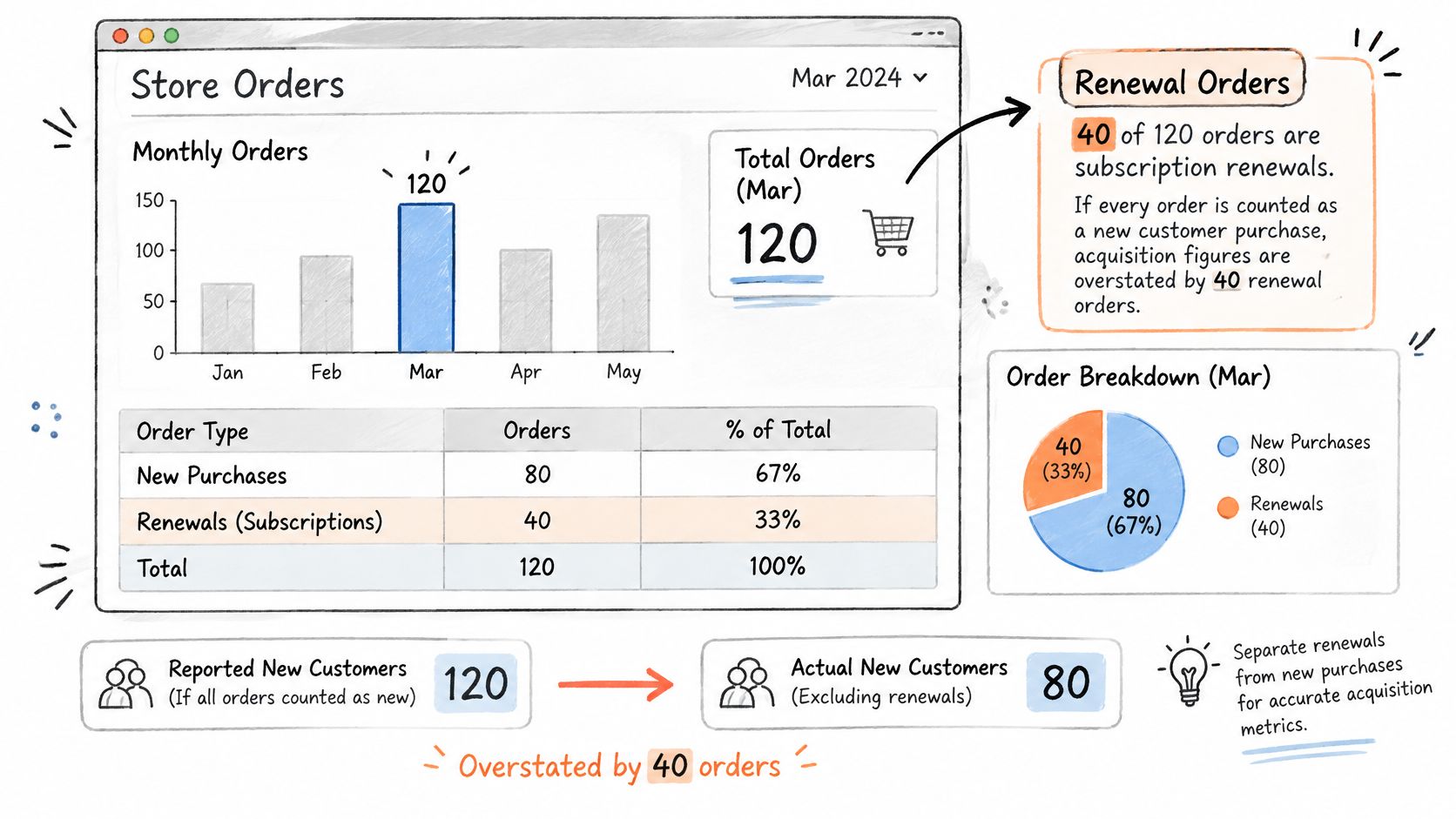
Subscription apps and payment flows can create renewal orders in BigCommerce. As the BigCommerce SubscriptionFlow app listing illustrates, renewal activity can flow back as orders. An export may therefore contain a one-time purchase, an initial subscription order, and a later renewal in similar-looking order records.
Before calculating customer counts or sales, classify each order as a first-time purchase, renewal, upgrade, refund, pause, or cancellation when those details are available. Deduplicate buyers with a stable customer ID, and show one-time order revenue separately from renewal order revenue. Label both as order revenue, not recurring revenue.
If subscriptions are billed outside BigCommerce, use that billing system's subscription state for subscription-specific measures. An order total alone can't establish active subscription status or recurring revenue.
The video below provides additional context on separating renewal activity from first purchases.
Choose the Right Reporting Method for Your Store
Match the method to the question and the work your team can maintain. Native Analytics is a good fit for trends, date-range comparisons, and quick checks. A CSV export works for a one-off line-level analysis, but you'll need to repeat it for each new period or question.
Looker Studio through BigQuery suits a team that can maintain the data model and wants interactive reports. Direct API work makes sense when you need custom logic at scale and have developer time to build and support the pipeline. A third-party tool can be more practical when you want to ask plain-English questions and save charts without managing that infrastructure.
Chartsy's BigCommerce analytics tracks revenue and product performance at store, category, product, and SKU levels, with exports to PDF or PNG. You can ask a question in plain English and get charts instantly. Before depending on any tool for a recurring report, verify that its supported metrics and data history match the decisions you need to make.
Try a reconciliation test: Pick one question from the table, answer it in native Analytics, then export the same period and compare the net figures with order totals. If they don't match, check refunds, the date basis, and the tax basis first.
Chartsy helps BigCommerce merchants explore sales and product performance with plain-English questions and exportable charts, without manually building complex spreadsheets. Create a report for a specific question, such as net sales by variant SKU, and see whether it gives your team a useful repeatable view. Visit Chartsy to get started.

Written by
Chartsy TeamAnalytics team at Chartsy
The Chartsy Team writes guides, product updates, and resources to help SaaS and eCommerce founders make sense of their metrics, without SQL or spreadsheets.
Chartsy