
It's Monday, you're checking last month, and three screens disagree. Your dashboard revenue tile says one total, finance's export says another, and your product spreadsheet says a third. None of them is necessarily wrong. They're just counting different things, and until your team says out loud what's in and what's out, BigCommerce analytics will keep producing arguments instead of answers.
Table of Contents
- The Sales Numbers Worth Agreeing On
- Native Analytics Insights Exports and Apps
- Sales by Product Category and SKU
- Orders Discounts Refunds and Tax
- Customer Segments and Fair Period Comparisons
- Five Store Questions and Where to Answer Them
- Build One Report You Can Repeat
The Sales Numbers Worth Agreeing On
Start by fixing your glossary before you compare any two months. Gross product sales is the value of items sold before refunds. It's not the order total a shopper paid, because that total can also contain tax and shipping, and neither one tells you whether a product sold well.
What each figure is not
Discounts are coupon, promotion, and price reductions taken at checkout. They're not refunds. A refund is money returned after the order already exists, and that timing matters. BigCommerce's refund documentation shows the refund starts as a quote that calculates the tax amount, total refund amount, and available payment methods, and the example total includes shipping, tax, and product cost. That's why one lump refund number is a weak stand in for lost product sales. If you subtract the whole quote from product sales, you've also subtracted shipping and tax that were never product revenue.
Tax collected is money you hold to remit. It's not sales and it's not profit. Shipping charged is what the customer paid to get the order delivered. Leave it in a product ranking and heavy, low value items can look stronger than they are.
Working rule: Every sales figure on a report should carry a short label saying whether tax, shipping, discounts, and refunds are in or out.
For merchandising, the most useful shared figure is usually net sales, meaning product sales after discounts and after the product portion of refunds, with tax left out. Write that definition on the report itself. A reader who can't see the definition will assume their own.
Average order value, or AOV, is order value divided by order count. It's only comparable if both reports use the same order value. One AOV built on tax inclusive order totals and another built on product sales alone will differ even when shoppers behaved identically, so name the base every time.
Refund rate is refunded value or refunded orders divided by a named sales or order base. Say which base you used, because refunded orders over total orders answers a service question, while refunded product value over gross product sales answers a product question. It isn't churn, and it doesn't measure repeat buying. Customer lifetime value is the net sales one customer generates over a set window. It's a revenue measure, not profit, so only compare it on the same net sales definition you use elsewhere.
None of these figures is profit. Profit needs product cost and other costs that the order record doesn't supply, so don't rename revenue as profit in a spreadsheet column. If you want a wider view of how operators frame these tiles before building, interpreting store metrics with PlatformDTC is a useful companion read alongside your own glossary.
| Figure | What it counts | Keep out | Usual home |
|---|---|---|---|
| Gross product sales | Item value sold before refunds | Tax, shipping, and profit | Product and order reports |
| Discounts | Coupons, promotions, and price reductions | Refunds | Promotion and order data |
| Refunds | Amounts returned after a refund quote | A flat percent of sales | Refund records and order exports |
| Tax collected | Tax charged on the order | Revenue and net sales | Order tax data |
| Shipping charged | Shipping the customer paid | Product performance | Order totals |
| Net sales | Product sales after discounts and product refunds | Tax and unverified cost | Calculated from order lines |
| Average order value | Order value divided by order count | A second AOV with a different tax or shipping base | Store analytics summary |
| Refund rate | Refund value or refunded orders over a named base | Churn or profit impact | Custom from orders and refunds |
Keep this table where your team opens reports, not in a policy folder nobody reads. When two totals disagree, check the Keep out column first. Most mismatches are a tax or shipping inclusion problem, not a sales problem.
Native Analytics Insights Exports and Apps
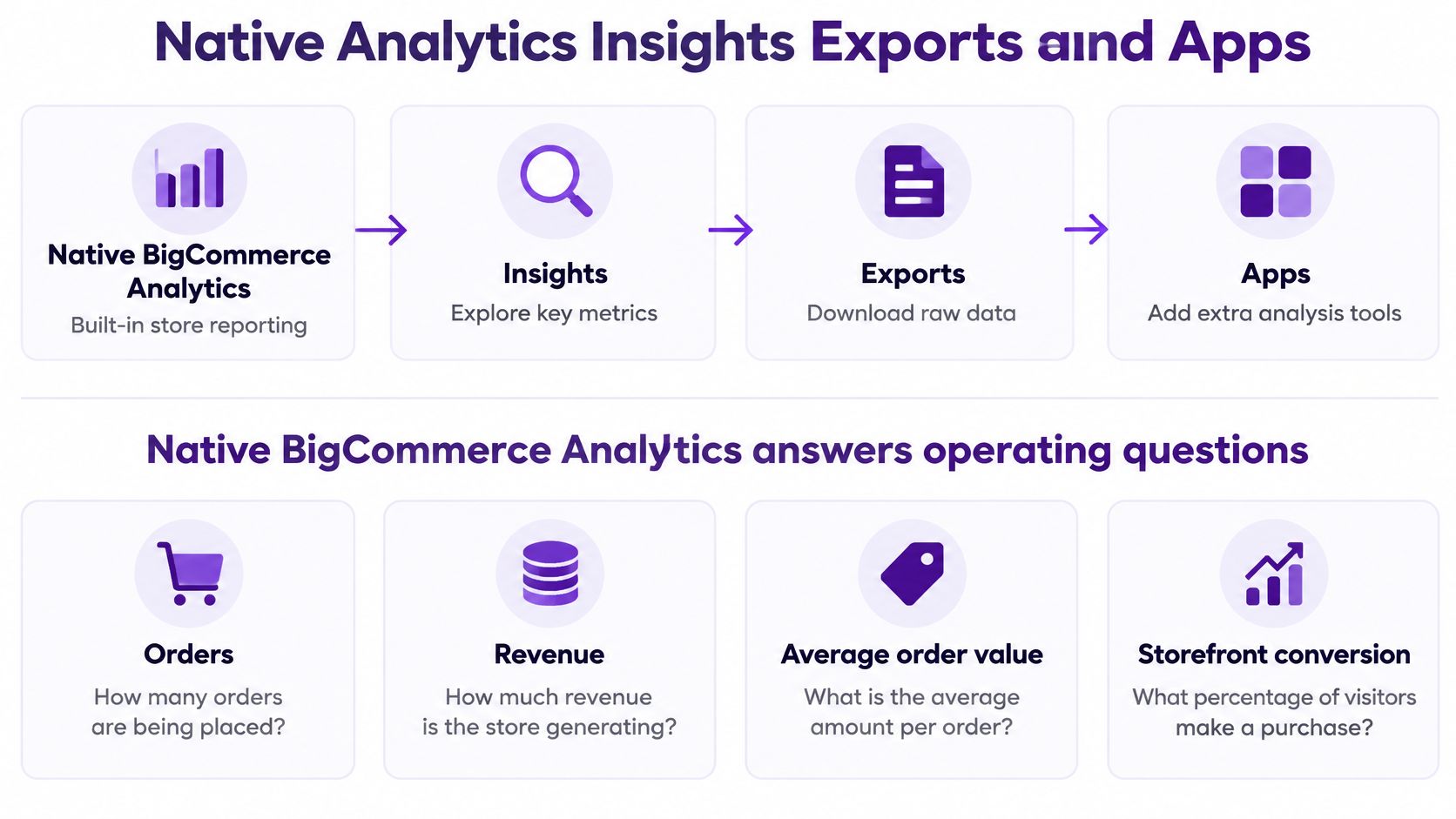
BigCommerce analytics isn't one tool. It's four surfaces, and picking the wrong one is usually why a simple question turns into an afternoon of exporting. The diagram below maps where each one sits.
The two preset surfaces
BigCommerce Analytics is your fast operating check. It covers orders, revenue, AOV, storefront conversion, and sales channel. BigCommerce's Insights product page describes native analytics around orders, sales channels, storefront conversion, average order value, product performance, promotions, and funnel drop off, and it flags orders as 'Unattributed' when no marketing channel can be assigned. Treat Unattributed as a real bucket to review, not as missing data you can spread across channels.
BigCommerce Insights goes further into product performance, promotions, and where shoppers leave the funnel. It's the better first stop for a merchandising question such as which products are viewed often but bought rarely. What neither preset gives you is a free form column builder. If the chart doesn't offer the field, filter, or date range you need, you're done there, and that's a boundary to accept rather than work around with screenshots.
The short walkthrough below shows the native screens in use, which helps if you're deciding whether a preset already answers your question.
When exports and apps earn their place
A control panel order export gives you line level control over columns and dates. A technical team can go further with the Orders API, but for most operators the export is the practical route. The cost is maintenance. Every rerun risks someone adding tax into product sales, filtering a different order status, or trusting an outdated refund flag, and the sheet rarely records who changed what.
A reporting app fits when several people need the same filtered view repeatedly, for example monthly net sales by category with discounts and refunds shown beside it rather than buried inside it. It doesn't replace the control panel for order management, and it can only report on fields its connection supports. Next Point Digital's ecommerce analytics overview is helpful background on how dashboard layers generally sit on top of store data, but your own question should still decide the surface.
| Surface | Best question | Hard limit | Better fit when |
|---|---|---|---|
| BigCommerce Analytics | Orders, revenue, AOV, conversion, channel | Preset views and Unattributed orders when no channel matches | You need a fast store check |
| BigCommerce Insights | Products, promotions, funnel drop-off | Not a free-form column and filter builder | Merchandising wants preset commerce views |
| Order and product export | Line-level rebuild with your own columns and dates | Manual, and easy to mix tax with sales | One analyst can maintain the sheet |
| Reporting app such as Chartsy | A repeated plain-English question with filters | Only fields the connection actually supports | The same cut is needed every week |
Match your actual question to one row before you build anything. If a native screen answers it in two clicks, stop there. There's no prize for rebuilding a working preset in a spreadsheet.
Sales by Product Category and SKU
A healthy product total can hide a dead variant. Say your high top sneaker looks fine for the month, so you reorder evenly across colors and sizes. If the red size 10 carried almost every unit, you've just bought more of the blue stock that's already sitting still.
Three levels that should stay separate
BigCommerce's product variants API documentation treats a variant as a version of a product with its own SKU, so red and blue versions of a high top sneaker can be two variants under one parent product, and each variant becomes a first class catalog entity when a product has real options. A SKU, short for stock keeping unit, is the code that identifies that exact buyable version.
That structure gives you three reporting levels, and collapsing them is the mistake to avoid:
- Category: Use it for assortment questions, such as whether sneakers grew while sandals shrank.
- Parent product: Use it for style questions, such as whether the high top line as a whole holds up against your runner.
- Variant or SKU: Use it for option questions, such as which color and size combination moved.
Compare variants inside one product before you compare products across categories. A parent total blends option choices that shoppers made for different reasons. A variant table shows you the choice itself.
Columns that make the cut readable
Build the report with product name, variant ID, SKU, option values, units sold, gross product sales, discounts, refunded units, refund value, and the date range. That set lets you separate a variant that sells at full price from one that only moves under a promotion, and a variant that sells well but returns often from one that is unpopular.
If one option supplies most of the units, the parent total is the wrong reorder signal.
Watch price context. Storefront results can reflect customer specific pricing and catalog access under customer group rules, so two shoppers may not have seen the same price for the same SKU. Keep a customer group or price context field in the export when it's available rather than assuming one price explains the revenue.
Start in native product performance for a parent level ranking. That's quick and it's usually enough to shortlist suspects. Move to an order or product export when you need option values and refunds in the same table, because that's where a variant question gets answered. A saved custom report earns its place when the question is as specific as "Which product variants generated the most net sales last month?" and you'll ask it again next month.
Read category totals with the same skepticism. A strong category can be one SKU doing all the work, which is a concentration risk, not broad demand. Check the top variant's share of category units before you call the category healthy.
Orders Discounts Refunds and Tax
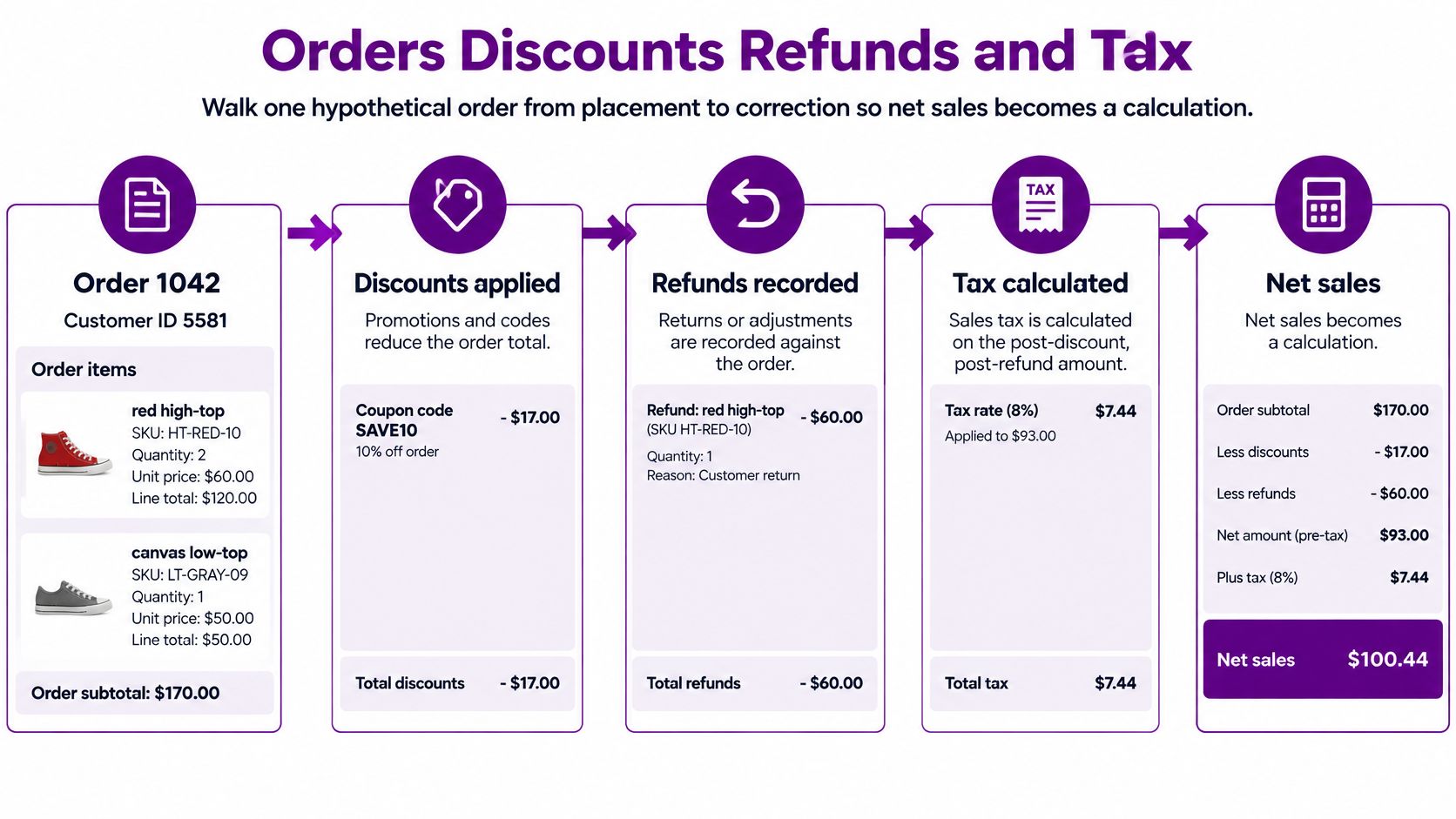
Net sales stops being abstract when you follow one order through correction. Take a hypothetical example. Order 1042 belongs to customer ID 5581 and has two lines, a red high top, SKU HT-RED-10, quantity 2, and a blue high top, SKU HT-BLU-10, quantity 1.
The flow below shows how that order moves from placement to a net sales figure you can defend.
Steps that keep the calculation honest
- Confirm the status counts as a sale: Keep order ID, customer ID, product ID, variant ID or SKU, quantity, status, discount, and order date in the export, then drop incomplete and unpaid orders as your own status list defines them.
- Isolate the discount: Put the coupon or promotion amount in its own column, so a promotion month isn't misread as weaker demand.
- Split the refund: When one red high top comes back, separate refunded product value, refunded shipping, and refunded tax instead of subtracting one lump sum from gross sales.
- Calculate net sales: Use product value after discounts and after the product portion of the refund, and show tax in its own column beside it.
Tax needs its own source. BigCommerce's order management OpenAPI specification exposes order tax data as a separate resource that can retrieve all taxes associated with an order, with a details=true parameter returning additional tax information and records that can include order_product_id and line_item_type. That link to a specific product line is what lets you say which item carried which tax, instead of spreading an order total by guesswork.
Spreadsheet trap: Don't use the legacy product level
refundedfield for current refund reporting. It's deprecated and refunds don't update it, so a sheet built on it can look clean while quietly missing returns.
Use quantity_refunded or the order refunds endpoints instead, and check your result against the refund rate definition your team agreed on. An order can be refunded in part, so quantity matters as much as value. One returned unit from a two unit line halves that line's kept product sales, but it doesn't halve the order's shipping or necessarily its tax.
Also keep refund timing visible. An order placed in August and refunded in September belongs to both months in different reports, sales by order date and refunds by refund date. If you force both into the order month, September looks cleaner than it was. State which date drives each column and your month end reconciliation gets much shorter.
Customer Segments and Fair Period Comparisons
Define your customer segments before you rank anyone. New versus returning sounds obvious until two people build it differently and argue about growth. Use order records, not email opens or account creation dates.
Segment definitions you can audit
A new customer is someone whose first order falls inside your window. A returning customer already had an order before that window opened. A repeat buyer in a period is a customer with more than one order in that period, built by grouping the order export on customer ID and counting orders.
Keep one time buyers in their own segment. A holiday spike can flood you with first time buyers who never return, and if you blend them into your repeat base, a seasonal promotion starts to look like loyalty. For a deeper worked approach to grouping shoppers, the guide to BigCommerce customer segmentation covers how operators structure those segments in practice.
Customer groups need separate handling when groups see different prices or different catalogs. Averaging a wholesale group and a retail group into one AOV produces a number that describes neither. Report each group's orders, net sales, and AOV on its own line, then compare groups side by side.
Rules for comparing two periods
A period comparison is only fair when both sides follow identical rules:
- Same net sales formula: Don't leave refunds in one month and remove them in the other.
- Same order statuses: Apply the same completed sale filter to both windows.
- Same discount treatment: A promotion heavy month needs its discount column visible, not netted away.
- Same tax and shipping decision: Pick in or out once and hold it.
Once the rules match, split any change into three causes. Did you get more orders? Did shoppers buy a higher value product mix? Or did refunds swing? Those need different responses. More orders with flat AOV points at traffic or conversion. Flat orders with rising net sales points at mix or pricing. Rising gross sales with flat net sales points at returns, and that's a product or sizing conversation, not a marketing win.
Native Analytics and Insights cover the broad customer and period views well enough for a weekly check. Narrower cuts, such as repeat buyers by category or returning customers by state, usually need an export grouped on customer ID. Either way, write the segment definition on the output. "Returning" without a window is a label, not a measure.
Five Store Questions and Where to Answer Them
Give each question a first path before any custom build. The lookup below shows the native or export route to try first, then the point where rebuilding the spreadsheet becomes the bottleneck.
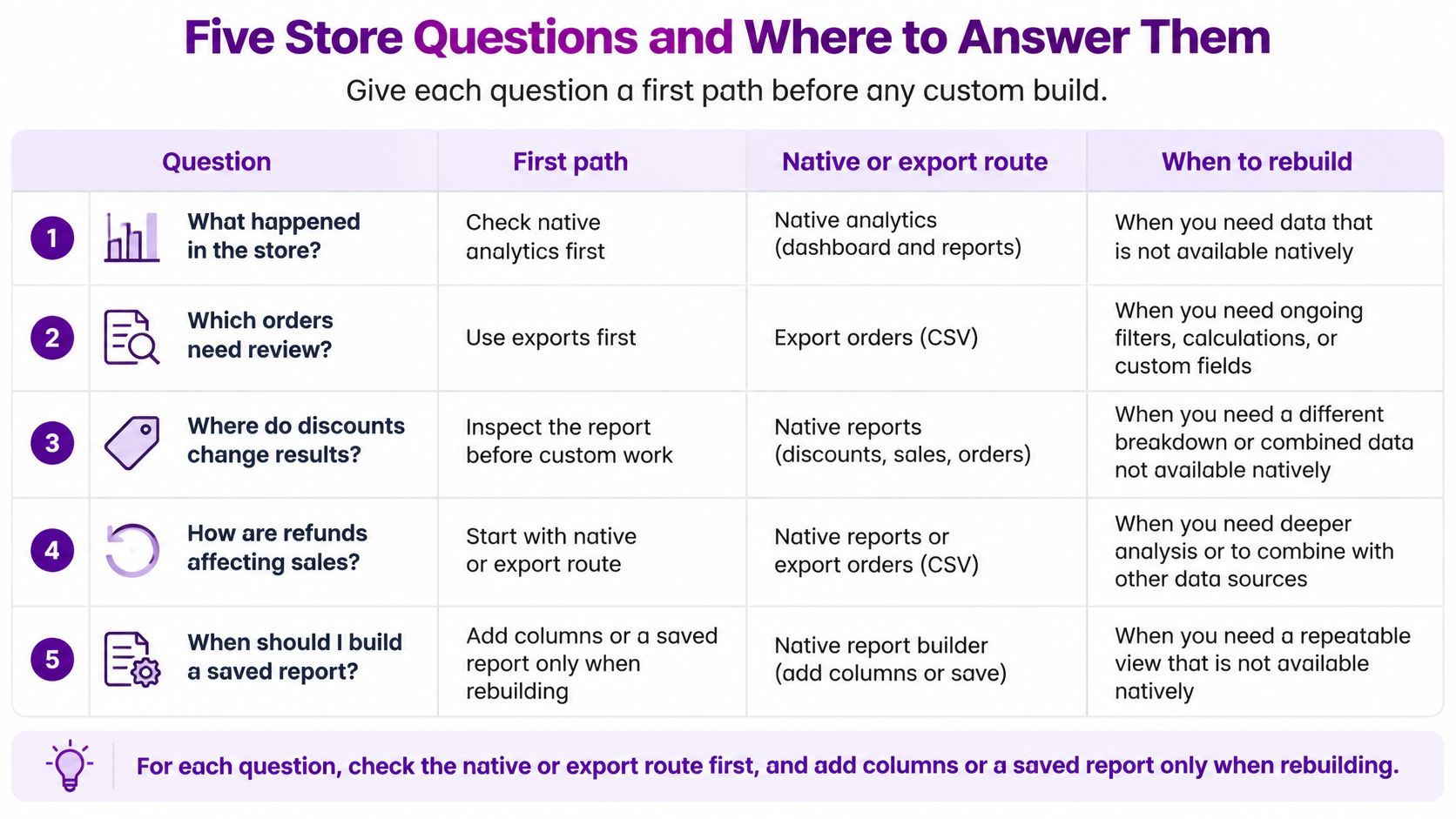
These cuts are rebuildable because each order carries the identifiers you need. BigCommerce's orders overview explains that an order can reference a specific customer through customer_id and product lines can include variant information, with Orders V2 providing order management endpoints and Orders V3 exposing transaction and refund endpoints. In plain terms, you can group the same order lines by customer, product, SKU level variant, or order instead of treating every purchase as one undifferentiated total.
| Question | First path | Columns to add | Build a custom report when |
|---|---|---|---|
| Which product variants generated the most net sales last month? | Product performance shortlist, then order or catalog export | Variant ID, SKU, option values, quantity, discounts, refunded product value | The same variant ranking is needed every month |
| Show monthly sales by category, including discounts and refunds | Category rollup in Insights or Analytics if available | Category, discounts, refunded product value, refunded tax beside net sales | The preset hides discount or refund columns |
| Which customers made more than one purchase this year? | Order export grouped by customer ID | Customer ID, order count, order status | The repeat-buyer list is rebuilt on a regular basis |
| Compare September and August sales by SKU | Same status filter and net sales math on both months | SKU, units, net sales, refunded product value, date range | The same two-month comparison is repeated each month |
| Show sales and refunds by customer state | Order export with the order address | Shipping state, sales, refunded product value | Refunds by region are checked every week |
How to work each one
For variant net sales, shortlist in product performance, then export with variant, SKU, quantity, discounts, and refunded product value. For monthly category sales, take the category rollup if a preset shows it, and add discount and refund columns from the export when it doesn't. For repeat buyers, remove incomplete orders first, then count orders per customer ID, because an abandoned second order isn't loyalty.
For September versus August by SKU, run identical filters on both months and sort the gap into units, mix, or refunds before you brief anyone. For sales and refunds by state, split the two measures. A high sales state with high refunded product value may have a sizing, shipping time, or product expectation problem that a sales only map would celebrate.
Build One Report You Can Repeat
Pick one question and write its metric in a single sentence. A sound example is last month's net sales by variant, after discounts and refunded product value, with tax shown beside it and incomplete orders left out. If that sentence can't be written, the report isn't ready to build.
If native Analytics or Insights already answers that sentence, stop there and save the view. If it needs columns and a date filter, build it once in an export and keep the column list with the file, so next month's run matches this month's. For broader thinking on structuring a report people act on, analytical reporting with Come Together Media offers useful examples of how reporting formats shape decisions.
Chartsy fits at the point where the same question comes back every week. Its BigCommerce analytics lets you ask questions in plain English and get charts instantly, and it tracks revenue and product performance at store, category, product, and SKU levels with exports to PDF or PNG. The BigCommerce Pro plan has a 14 day free trial with no credit card required and can be cancelled anytime, so check current terms on its e commerce pages before you start.
Check any new chart against one order you already understand before you trust it with a second one.
Be clear about scope. This workflow doesn't produce profit, advertising attribution, inventory forecasts, or live sync, and it shouldn't pretend to. What you get is one report your merchandising team can rerun without rebuilding a spreadsheet each month, with definitions everyone has already agreed on.
Pick your variant net sales question, write its definition in one sentence, and build that single report first. Chartsy lets you ask it in plain English and keep the resulting chart at store, category, product, or SKU level, so next month's answer takes minutes rather than another spreadsheet rebuild.

Written by
Chartsy TeamAnalytics team at Chartsy
The Chartsy Team writes guides, product updates, and resources to help SaaS and eCommerce founders make sense of their metrics, without SQL or spreadsheets.
Chartsy